Consolidated reporting for groups running on Xero
Xero stops at the organisation boundary. This doesn't. Consolidate P&L and balance sheet across every entity, in one reporting currency, with the variance analysis to explain what moved and why.
Private access. We onboard groups one at a time.
Or explore a fully populated demo company — no credit card, no Xero connection needed.
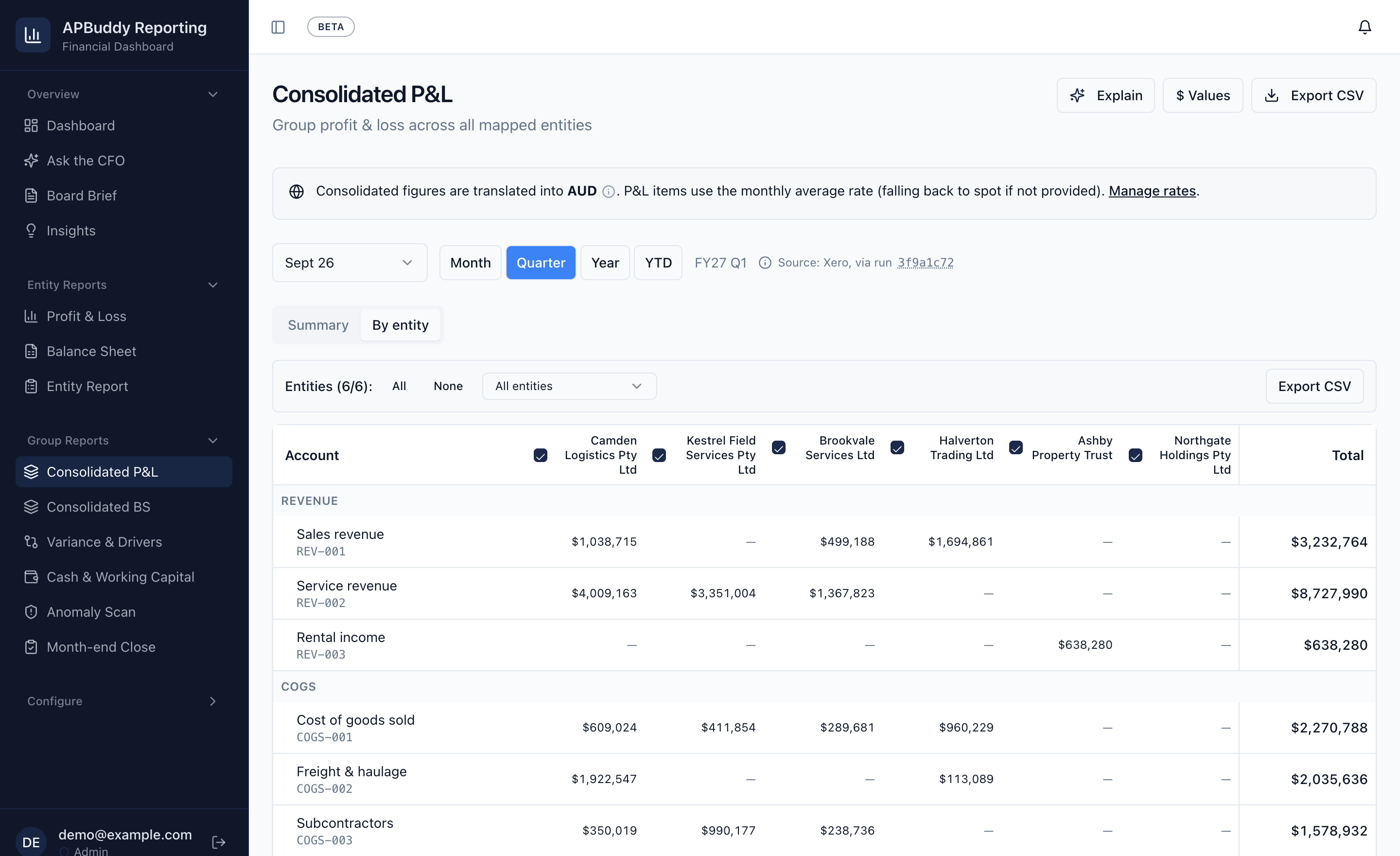
- 1 Every entity translated into one reporting currency, with the rate policy stated on the page.
- 2 Any period, as a month, quarter, year or fiscal YTD.
- 3 One column per entity, then the group total they sum to.
The real app, showing a sample group. Figures and entity names are invented.
See what moved, then who moved it
Ranked movers between any two periods. Expand one and the entities behind it appear, and those figures sum exactly to the movement above them, so a drill-down never disagrees with the total.
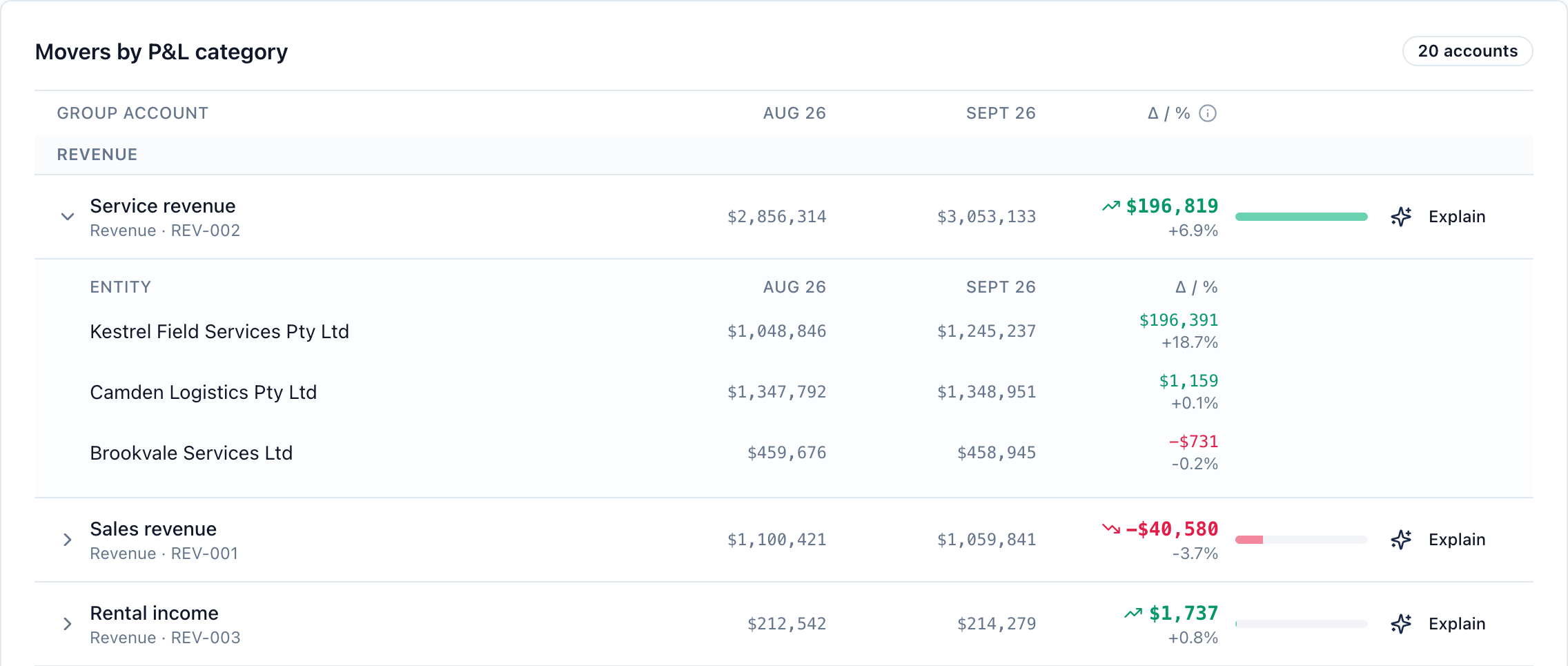
- 1 Movement in dollars and percent, between any two periods you pick.
- 2 Expand a line to see which entities drove it. They sum to the line.
- 3 Explain sends that line to the AI analyst, working from the same figures.
The real app, showing a sample group. Figures and entity names are invented.
Know whether the books actually closed
Signing off on the fifth is a decision. Whether material value stopped moving after it is a measurement, taken across every entity at once.
All four detectors →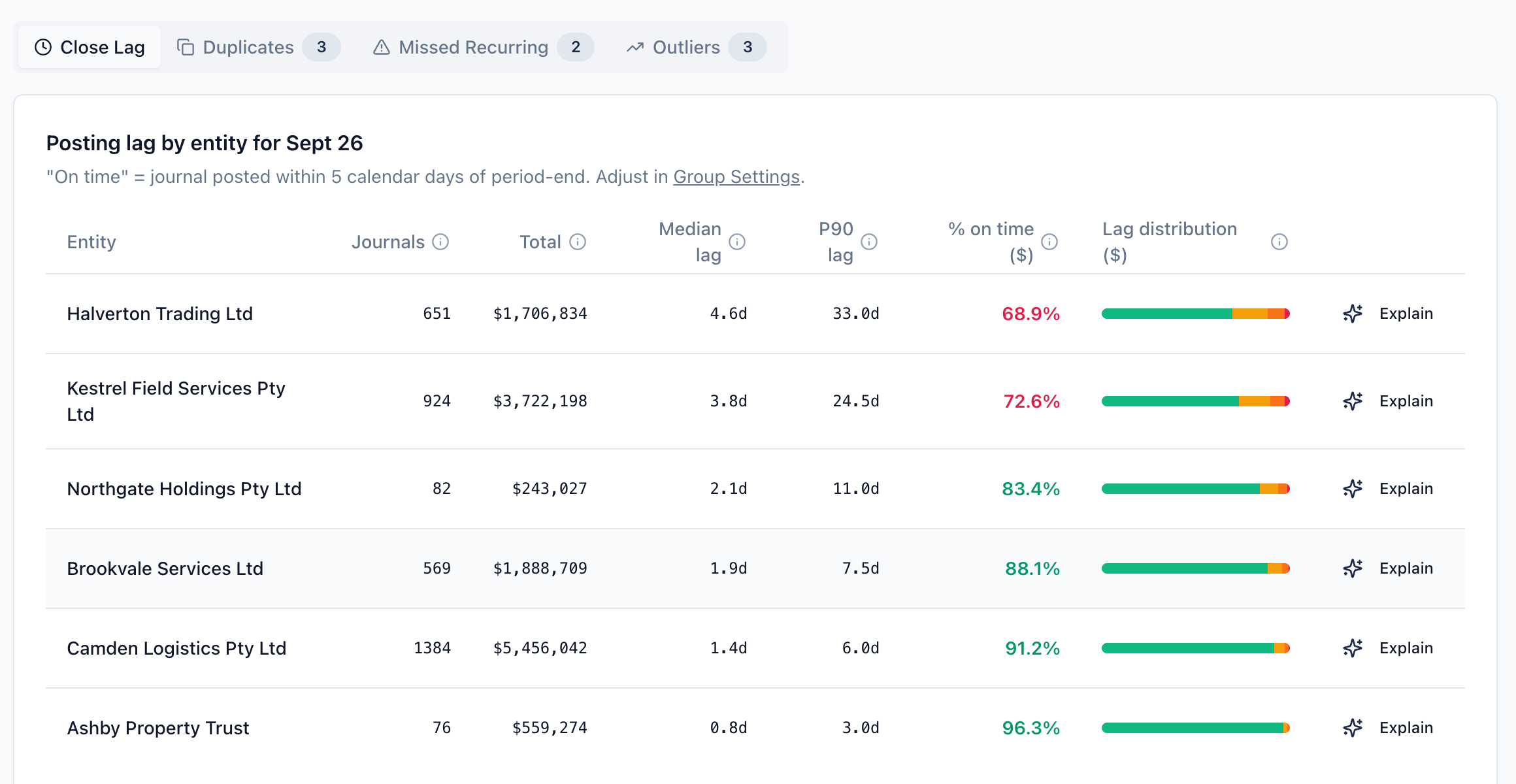
- 1 Four detectors over every entity's journals: close lag, duplicates, missed recurring entries, outliers.
- 2 The share of posted value that landed on time, against a window you set.
- 3 How the late value splits: 5 to 30, 30 to 60 and over 60 days.
The real app, showing a sample group. Figures and entity names are invented.
A board brief that shows its working
Written from the consolidated numbers and saved with its citations, so every figure in the narrative traces back to the data it came from.
How the grounding works →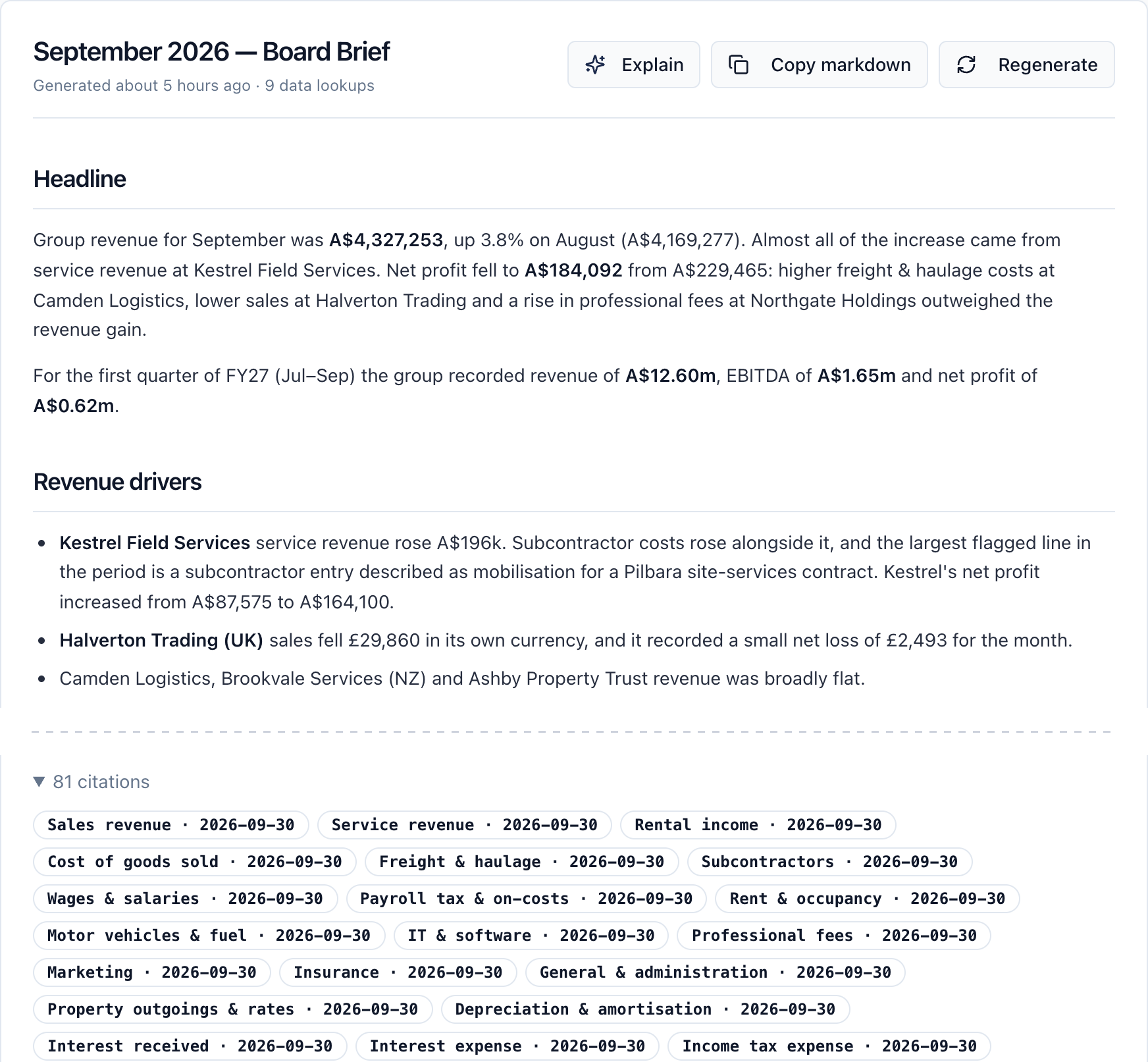
- 1 Written from the consolidated figures for the period, in the voice of a finance partner.
- 2 Saved with its citations: the accounts and periods each figure came from.
The real app, showing a sample group. Figures, entity names and the brief’s text are invented: it was written for this capture, not generated.
What the reports cover
One P&L across every entity
Month, quarter, year or FYTD
The balance sheet is taken at period end rather than summed, because a quarter's balance sheet is a position, not a total.
Multi-currency, done properly
Average rate for P&L, closing for BS
Rates stored per period so restatements reproduce. A missing rate is flagged on the report, with the amount left untranslated.
Variance you can drill into
Ranked movers, expandable by entity
Per-entity figures reconcile exactly to the group number above them.
Cash and working capital
Group and per entity, tracked over time
Cash, receivables, payables, debt, with current and quick ratios.
Close controls on every ledger
Four detectors, all entities at once
Close lag, duplicate journals, missed recurring entries and amount outliers.
How the controls work →AI analysis you can trace
Every figure pulled by tool call
Ask questions in plain English; board briefs and month-end memos save their citations.
How the grounding works →Getting set up
-
1
Connect each Xero organisation
OAuth per entity. The app reads from Xero and writes nothing back.
-
2
Map to a group chart of accounts
Done alongside you during onboarding, not handed over as homework.
-
3
Report across the group
Statements, variance, cash and close controls, from the next sync onward.
Against a consolidation spreadsheet
| Spreadsheet | APBuddy Reporting | |
|---|---|---|
| Adding an entity | Rebuild the workbook | Connect and map |
| Restating a period | Hope the rates were saved | Stored per period, reproduces |
| Finding what moved | Manual variance column | Ranked movers, drill to entity |
| Cross-entity duplicates | Not visible in any one ledger | Detected across all of them |
| Knowing the books closed | A date someone signed off | Measured posting lag by value |
If a spreadsheet still works for your group, we will say so — the honest comparison covers where it genuinely wins.
See it on your own numbers
We onboard groups one at a time, with setup done alongside you rather than handed over. A call is the fastest way to know whether it fits.
The demo is a fully populated company across APBuddy and Reporting — no credit card, no Xero connection needed.
Questions we get asked
How do you consolidate a P&L across multiple Xero entities? +
Each entity's chart of accounts is mapped to a shared group chart of accounts, so accounts that mean the same thing across entities roll up to the same line. Figures are pulled from Xero per entity per month, translated into one reporting currency, then summed. Unmapped accounts are excluded from the totals and reported separately, so a mapping gap understates visibly rather than silently.
Can Xero consolidate multiple companies? +
Not on its standard plans. Each Xero organisation is a separate ledger with its own chart of accounts, and Xero's own reports stop at the organisation boundary. The exception is Xero Ultra, launched in Australia in July 2026, which adds consolidation for up to five entities through Syft Advanced, a separate app with its own login. Otherwise, consolidation across entities needs a spreadsheet or a layer above Xero that reads each organisation through the API and rolls the results up. What Xero does and doesn't do for groups
How is foreign currency handled when consolidating? +
Profit and loss is translated at the average rate for the period, and the balance sheet at the closing spot rate — the standard treatment. Rates are stored per month per currency, so a restated period reproduces the same figures. If a month has no rate of its own, the most recent rate from the previous 60 days is used, and an average rate falls back to spot. Where no rate applies at all, that entity drops out of the translated total, and the report carries a warning giving the number of missing rates and the untranslated amount in each currency, and saying the totals are understated. CSV exports of the consolidated P&L and balance sheet state how many entities the total covers.
What happens when an entity is closed or migrated to a new company? +
The closed entity keeps its history and stays selectable, but stops being synced and drops out of the default 'all entities' selection. Reporting groups let you view a closed entity and its successor together as one line, so a migration mid-year does not break the comparatives.
Do you need to change anything in Xero? +
No. Reporting reads from Xero through the API and writes nothing back. Your charts of accounts, tracking categories and existing reports are untouched — the mapping to a group chart of accounts happens on our side.